AI multilingual digital menu

Scan to know, dine with confidence

Help your restaurant cross language barriers. AI translation, menu optimization and smart recommendations turn every dish into a multilingual digital menu, so guests from anywhere can discover and enjoy your food.

  • AI import from a photo or PDF
  • Automatic translation into 8+ languages
  • Allergens labeled on every dish
  • Scan a QR code — no app download

Free forever · No credit card · Cancel anytime

Scan to view menu
Breeze Bistro中 EN 日 한
SIGNATURE MAINS

Lobster seafood risotto

One of our signatures: fresh lobster over rice simmered in a rich, fragrant broth.
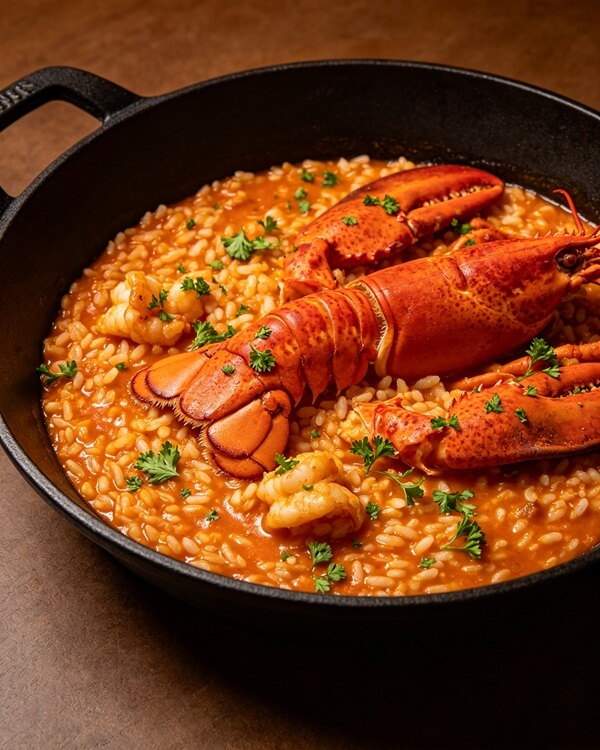
Lobster seafood risotto
$12.50
Gluten
Crustaceans
Fish
Eggs
Milk
中 · EN · 日本語 · 한국어

Trusted by restaurants around the world

Chinese KitchenIzakayaTrattoriaTapas BarSushi BarRamen HouseThai KitchenCafé & BakeryKorean TableSteak HouseChinese KitchenIzakayaTrattoriaTapas BarSushi BarRamen HouseThai KitchenCafé & BakeryKorean TableSteak House
The menu challenge

In a global era, language should never stand between guests and great food

68%

of international travelers give up on local dishes because of the language barrier

$700+

is the average cost of redesigning and reprinting a paper menu, every single revision

32%

of guests have special dietary needs but receive no accurate allergen information

Create your digital menu in three steps

01

Sign up

Only an email address is required to register.

02

Upload your menu

Photograph a paper menu, upload a PDF, or type dishes in by hand.

03

Generate & publish

AI translates and optimizes automatically, then creates your QR code instantly.

AI features

Everything for menu digitization and internationalization

Instant translation

8 languages including Chinese, English, Japanese, Korean, Russian, Thai and Vietnamese, with instant visual translation, currency conversion and pronunciation help.

AI menu recognition

Upload a photo or PDF and AI extracts dishes, prices and descriptions automatically, matching each dish with a photo.

Digital menu QR code

Generate your own QR code. Guests scan it to read the multilingual menu instantly — nothing to download or install.

Real-time updates

Change dishes and prices anytime; the cloud syncs instantly. No more reprinting paper menus.

Menu analytics

See browsing preferences and best sellers, refine menu structure and lift order conversion.

Allergen labels

22 common allergen groups flagged automatically on every dish, so guests dine safely and you stay compliant.

Leave the headaches of paper menus behind

The paper-menu trap

  • Unclear translations leave international guests afraid to order
  • Every price or dish change means redesigning and reprinting
  • Nowhere to put allergen information — hard to stay compliant
  • No insight into what guests browsed or wanted

What Caidanma changes

  • Update prices and dishes in seconds; printing costs drop to zero
  • Flip sold-out items on or off with one tap, live instantly
  • Crisp on every phone, with the language matched automatically
  • Browsing data flows back, so your menu keeps getting smarter

Two simple paths — for restaurants and guests

For restaurants · create in three steps

1

Capture or upload

Photograph a paper menu, upload a PDF, or type dishes in.

2

AI translation & optimization

Enter Chinese for instant translations; AI helps optimize and plan the menu.

3

Publish & share

Generate a QR code, then print it or share it for guests to scan.

For guests · scan and order with confidence

1

Scan

Point the camera at the QR code, or snap a photo of a paper menu.

2

AI visual translation

See dish photos, descriptions, nutrition and allergen alerts; listen to pronunciation.

3

Order with ease

Build an order list, show it to staff, and enjoy a stress-free meal.

AI menu assistant

Update your menu like sending a message

No complicated dashboard. Send the AI assistant one line of text or a voice note and the menu updates instantly.

  • Message to take a sold-out dish offline instantly
  • Send a voice note to change a price or description
  • Online 24/7 — changes reach guests' phones in seconds

AI Manager Coming soon to your merchant dashboard

The operations AI for restaurant owners: log sales, stock and attendance in one message, with a 7am briefing every day.

See capabilities

Frequently asked questions

What happens after I upload a menu photo?
AI recognizes dish names, prices and descriptions and generates multilingual versions. You can review and fine-tune every translation in the editor.
Where can I use the translated menu?
QR-code scanning, embedding on your restaurant website, social-media sharing, printed materials and more.
How do I edit an existing menu?
Open the menu in your dashboard and click edit. Content and translations update in real time and sync to the live version immediately.
Which languages are supported?
8 languages: Simplified and Traditional Chinese, English, Japanese, Korean, Russian, Thai and Vietnamese.
Do guests need to download an app?
No. Guests scan the QR code with their camera or any scanner and the menu opens directly in the browser.
Does it meet allergen-labeling regulations?
22 common allergen tags are built in and applied dish by dish, helping restaurants meet disclosure requirements; please confirm final compliance against local regulations.

Start today — let the world read your menu

Outstanding food, warm atmosphere, great service. Don't let an outdated menu hold you back. Start free, no credit card required.

Create your menu now